Wtf is MCP?
MCP is a new standard that helps AI tools connect to external apps and data. Here’s what it means, how it works, and why people care.

TL;DR
MCP (Model Context Protocol) is an open standard that lets AI assistants like Claude, ChatGPT and Copilot connect to the apps and files you already use, so they can work with your real emails, documents and data.
MCP stands for Model Context Protocol, which sounds painfully technical, but the idea is pretty simple. It's a shared way for AI tools to plug into other apps, files, databases and systems, so a connection doesn't have to be rebuilt from scratch for every AI app.
I’ve seen the USB-C comparison getting used a lot recently. Remember when Apple kept changing the charging port on the devices that came out each year, and you’d end up with a drawer full of perfectly good cables that no longer worked with anything you owned (I'm getting enraged again just typing this). Now USB-C covers most devices, so you don’t need a different cable for every single one. MCP does something similar for AI. A tool like Asana or Google Drive builds one MCP connection, and any AI assistant that supports MCP can use it.

Without it, an AI assistant can answer questions, write and brainstorm with you, but it can’t just reach into HubSpot and pull up a customer record. Someone would need to build a custom integration that teaches it how to work with HubSpot specifically. With MCP, the assistant can essentially say, “Cool, I know how to talk to this system,” and pull up the customer record you asked for.
What can MCP connect AI to?
Most of the tools a small business runs on already have an MCP connection. That includes Google Drive, Gmail, Slack, Notion, Asana, HubSpot, GitHub, Figma and Webflow, along with databases, local files and custom internal software.
Depending on how it's set up, a connection can let the AI read information, take actions like creating a task or updating a page, or both.
Who makes MCP, and which AI tools support it?
Anthropic, the company behind Claude, released MCP as an open standard in November 2024. In December 2025 it donated MCP to the Agentic AI Foundation, a fund under the Linux Foundation co-founded by Anthropic, Block and OpenAI, with backing from Google, Microsoft and AWS. No single company owns it now. Claude, ChatGPT, Microsoft Copilot and Gemini all support it, so an app that builds one MCP connection works with all of them.
Using MCP with Claude
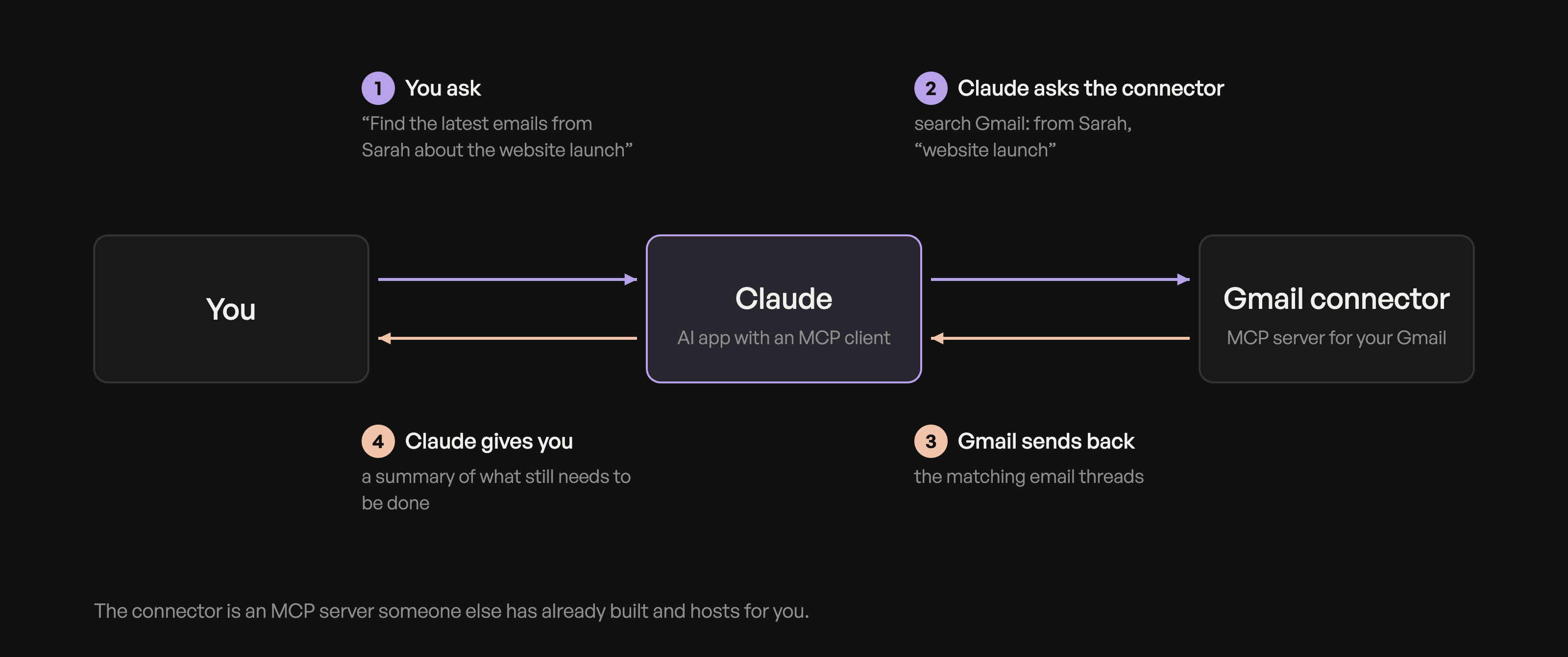
Say you want Claude to help with your inbox. You'd add the Gmail connector in Claude, sign in with Google and approve access on the familiar “allow this app to access your account” screen (that's OAuth). Behind the scenes, that connector is an MCP server someone else has already built and hosts for you.
If a tool doesn't have a ready-made connector, a developer can set up a custom MCP server instead. It sits between Claude and the tool, whether that's HubSpot or an internal database, and does the same job.
Either way, once it's approved you can ask something like:
“Find the latest emails from Sarah about the website launch and summarize what still needs to be done.”
Claude pulls the threads itself, so you're not copying emails into the chat.
I use Granola to capture notes from all my meetings, and it's connected to Claude through MCP. So I can ask Claude about a specific meeting or the follow-ups that came out of it, and it already has that context without me digging through my notes.
Is MCP the same as an API?
No. An API is how one piece of software talks to another, and most apps have their own. MCP sits on top of those APIs and gives AI tools one consistent way to use them, so the AI doesn't need to learn every app's API separately.
How can MCP help a small business?
For most business owners the value shows up in everyday work. That might be pulling numbers for a monthly report, drafting a follow-up from your notes on a sales call, checking a project's status without opening three apps, or updating website content. The AI is working from your own files, emails and data, so what it gives back is specific to your business.
You don't need to know how to build an MCP server to get any of this (though if you're curious, I'll be writing about that over on Medium). Most of it comes down to choosing which connectors to turn on.
What are the risks of connecting AI to your business tools?
Every connection gives the AI access to something, so decide what each one needs before you turn it on. A connector that can only read your calendar is low risk. One that can send emails, delete files or edit customer records deserves more thought, and many let you limit access to read-only or require your approval before the AI acts.

Prompt injection is also worth knowing about. Basically, if an AI can read something it didn’t write, like an email, document or web page, that content could contain instructions aimed at the AI rather than you. In a badly designed system, the AI could potentially treat those instructions as something it’s supposed to follow. Good AI tools ask before sending a message or making a change, and keeping that confirmation on is the simplest protection.
I'd start with one or two connectors you'd use every week, with read-only access, and add more once you're comfortable with how they behave.
How MCP works under the hood (for the nerds)

MCP has two main sides. The AI app you’re using, like Claude or ChatGPT, contains an MCP client that handles the protocol. On the other side is the MCP server, which connects the AI to a specific tool or source of data. The server tells the client what it can access or do, which generally falls into three categories: tools are actions the AI can take, like creating a task or sending an email. Resources are data it can read, like files or records. Prompts are ready-made instructions the server provides.
The two sides talk using JSON-RPC, a simple message format. A server can run locally on your computer, which is common for developer tools and file access, or remotely over HTTP. Remote servers like the Gmail or Granola connectors usually use OAuth for sign-in. The AI decides when to call a tool based on your request, and the app can ask for your approval before anything runs.
If you want to go a bit deeper, this video is a helpful breakdown: MCP in 20 minutes
Want your business to show up in AI answers?
MCP is one part of a much bigger shift in how people are using AI to find information, research products and make decisions.
The AI assistants your customers connect to their inboxes and files are also the ones answering their questions about which business to hire. If you want your website to be easy for those tools to find and recommend, take a look at my SEO services, where I research what your customers are searching for and asking AI tools, then write the articles that bring them to you.

Written by Aliya Conrad


more thoughts