Context engineering: building AI workflows that know what you know
As AI models get better, how you prompt matters less than what they know. Here’s what I’ve learned about giving Claude the context and reasoning I use in our agency’s SEO work.

TL;DR
- As AI models get better, how you prompt matters less than what they know.
- Context engineering means making sure the model has the information it needs throughout a task, including instructions, data, examples and previous decisions.
- For content work, give it what a strategist would check: the client’s positioning, audience, voice, performance data and first-hand experience.
- When you correct its work, save the reasoning behind your decision so it can apply that judgment next time.
The newest AI models are good enough that how you prompt matters less than what they know. Getting good content out of them increasingly comes down to gathering the information a strategist would check before starting, then writing down the judgment calls you make so the system can apply them next time.
I’ve been figuring this out as I build a Claude plugin for our agency’s SEO and content work. It needs access to the client’s data, an understanding of their business and audience, and some guidance on how to use that information. A model can know a lot about SEO without knowing whether this particular client needs another service page.
There’s a name for the work of getting that information into the workflow: context engineering. Here’s how I’ve been putting it into practice, from the initial audit through to content planning and writing.
What is context engineering?
Context engineering means deciding what information an AI model needs at each stage of a task and making sure it has access to it. That might include instructions, research, examples, analytics or decisions from earlier work.
It’s similar to briefing a freelancer. You can write a clear brief, but if they haven’t seen the client’s website, don’t understand the audience and have no idea what’s worked before, they’ll have to ask questions or make assumptions. Giving them that background helps them make better decisions without needing you to explain every step.
The same applies to AI, with one catch: giving it more information isn’t automatically helpful. Anthropic’s guide to context engineering recommends selecting the useful information carefully, since a growing context can make it harder for a model to use what’s relevant. An SEO audit needs search performance data. A voice guide needs writing samples. You need a way to bring in the right material as the work progresses.
You might also have heard “content engineering,” which AirOps uses to describe building repeatable systems for producing, managing and updating content. Context engineering is part of making those systems work: deciding what each stage needs to know and how that information gets there.
Better models change where the work goes
A lot of my earlier skills were long lists of instructions. Every time the model missed something, I’d add another step, sometimes with an ALWAYS or NEVER in capitals (because apparently I thought that would help). Some of that detail was useful, but some of it was compensating for things the model struggled to do reliably at the time.
Anthropic’s prompting guide for Claude Fable 5 recommends revisiting existing instructions and tools as the model’s capabilities improve. It describes improvements in following instructions over long tasks and working through ambiguous problems, both of which affect how much you need to spell out in advance.
For my plugin, the useful question has become: what would I know or check before making this recommendation? That includes the data I’d look at, but also the reasoning I’ve picked up from doing this work. If I’d choose to expand an existing page rather than create a new one, what led me to that decision? Can I give the model enough information to make that distinction too?
That’s where more of my work goes now.
How this works in an SEO audit
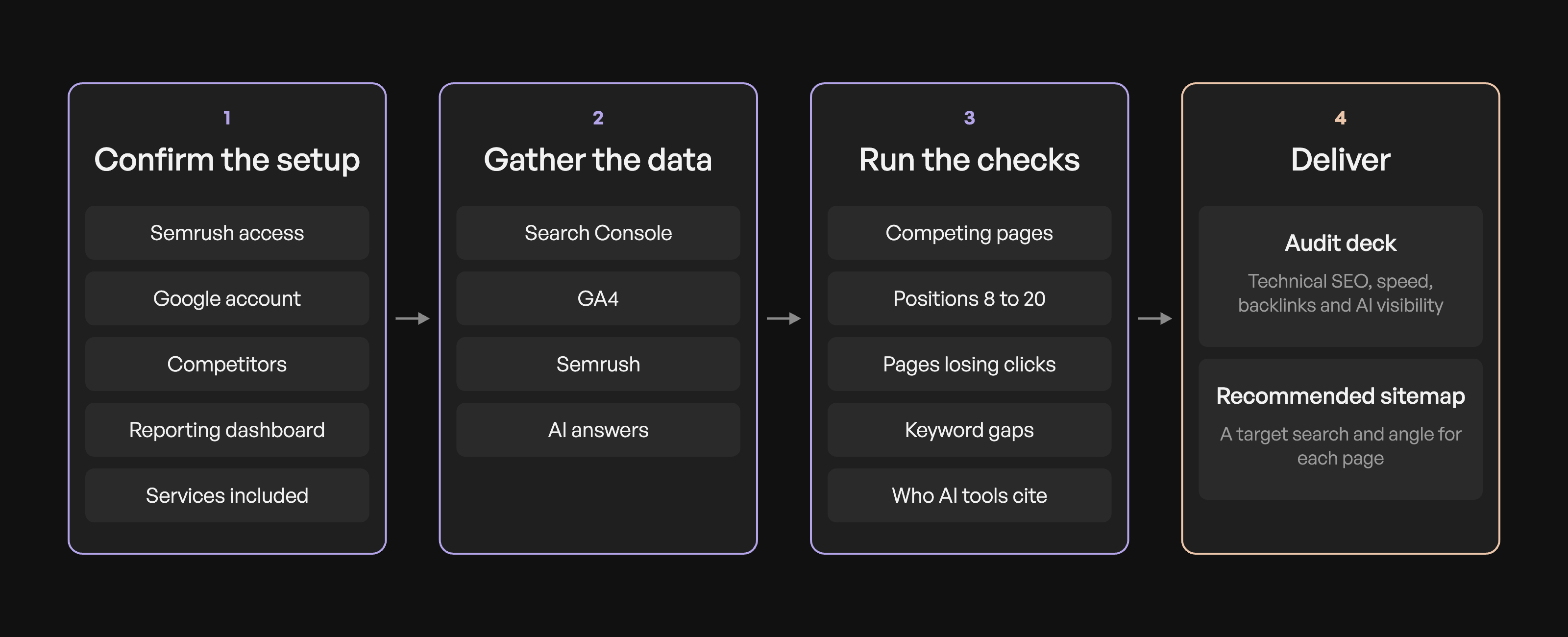
My Claude plugin helps our team gather client data, run an SEO audit and put together a recommended sitemap. At an agency, every client is set up a little differently. Their Google properties might be under different accounts, their reporting depends on the services they’re paying for, and the tools available can affect how we gather the data. Before the plugin starts an audit, it confirms:
- How to access Semrush. It can use the browser or the Semrush MCP. The MCP is faster, but it uses API credits and we have a limited number, so it defaults to the browser.
- Which Google account to use for the client’s Analytics and Search Console.
- Which competitors to review. It suggests a few for the strategist to confirm.
- Whether to set up the client’s reporting dashboard.
- Which services are included. Add-ons like local map pack tracking or brand mention monitoring affect what needs to be reported.
Then it runs the checks I’d run manually. In Search Console, it looks for pages competing for the same searches, pages sitting around positions 8 to 20, and pages losing clicks. In GA4, it checks whether conversions are being tracked, which pages bring in leads and how much referral traffic comes from AI tools. In Semrush, it looks at keyword gaps against competitors.
It also checks responses to the client’s key questions in Perplexity, Google’s AI Overviews, Claude and ChatGPT, looking at which sources appear and what those sources contribute to the answer.
The team gets a completed audit deck covering technical SEO, page speed, backlinks and AI visibility, plus a recommended sitemap with a target search and angle for each page.
The important part is that those recommendations come after reviewing the client’s actual situation. The workflow gives the model information it can use to decide which opportunities are worth pursuing.
What context does AI need for content?
Once the audit is done, the content work needs more background. Search data can help identify an opportunity, but it won’t tell the model what the client believes about the topic, what their customers keep asking or what they sound like when they explain something.
Tim Metz at Animalz breaks this down into seven kinds of context in his post on context engineering:
| Context | What to gather |
|---|---|
| Brand intelligence | The client’s positioning, business goals and voice |
| Author profile | The writer’s background, experience and opinions |
| Strategic context | What the content needs to achieve and the position it should take |
| Audience model | What readers already know, what they’re trying to decide and their objections |
| Competitive intelligence | What’s already being said about the topic |
| Quality examples | Published work that shows the standard you’re aiming for |
| Dynamic data | Recent performance, developments and previously published content |
That’s a useful starting point for the information behind a content workflow.
A client’s meeting notes can be especially useful here. They might explain a problem differently on a call than they do on their website, or mention a customer question that never made it into the brief. That first-hand detail gives the writing something specific to work with.
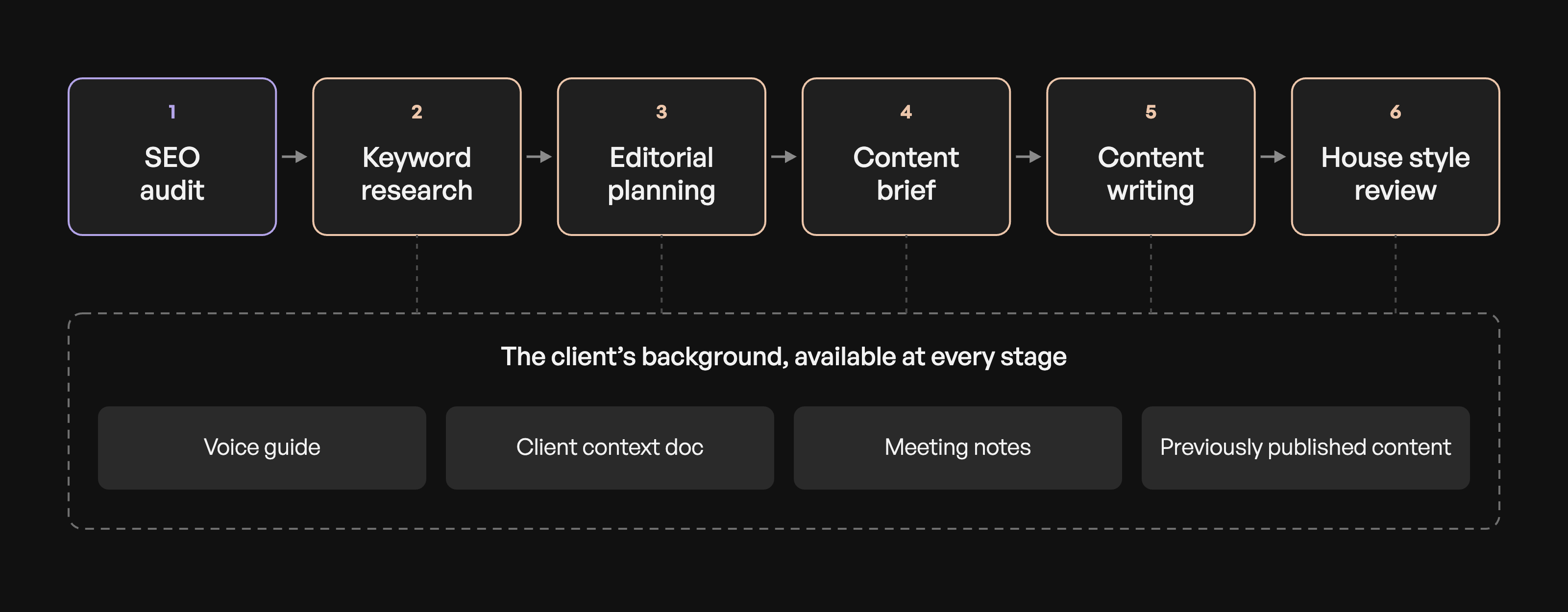
In my plugin, the content skills use what earlier stages have already gathered and saved:
- Keyword research uses the Semrush data to plan which pages to build or update and what each should target.
- Voice guide uses writing samples or a short interview to document how the client communicates. If they serve very different audiences, it can create a guide for each.
- Editorial planning plans blog and social content, taking previously published content into account so it doesn’t keep repeating the same ideas.
- Content briefs start with the audit findings for each page, then add customer language, relevant client experience and the argument the piece needs to make.
- Content writing requires the brief, voice guide and client context document before it starts. It also checks meeting notes for first-hand detail and fact-checks the draft before handing it over.
- House style review checks the writing against our editorial preferences, including phrases and habits we keep having to edit out.
The audit informs the brief, the brief informs the draft, and the client’s background stays available throughout. We shouldn’t have to research the same thing again because we’ve moved to another stage.
Save the reasoning behind your corrections
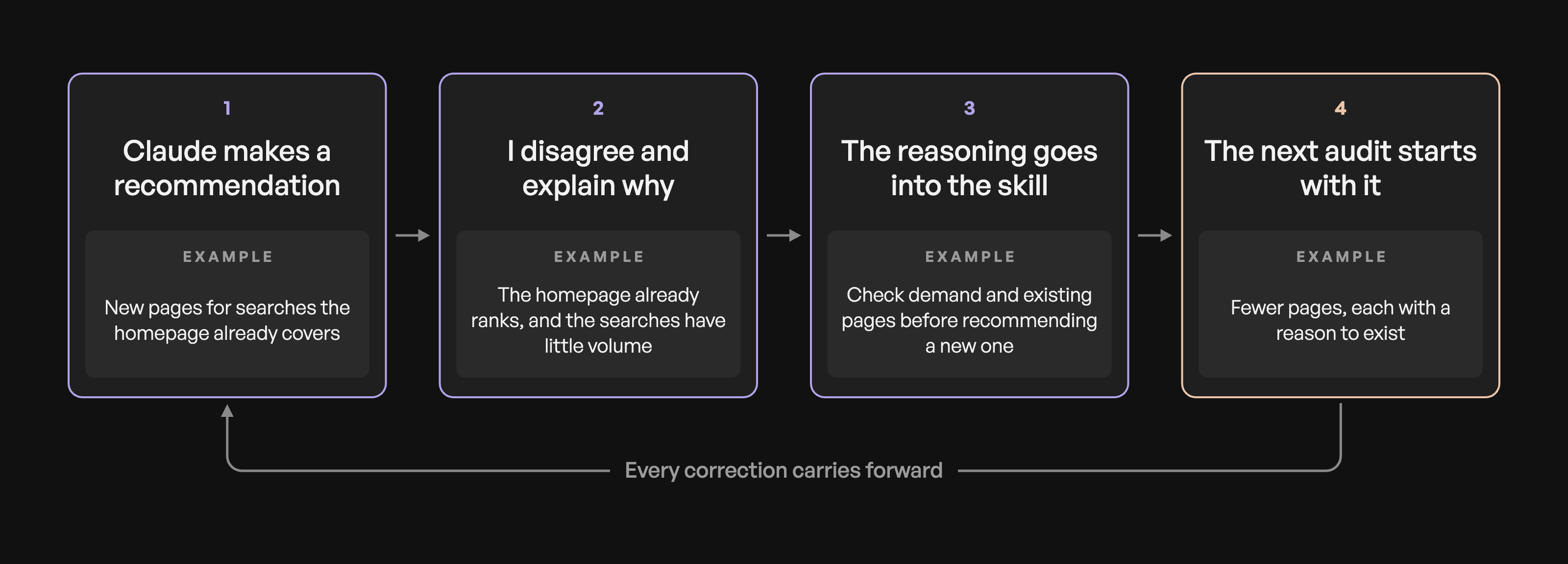
The other half of this is recording the decisions I make when reviewing the work. When I disagree with a recommendation, I explain why and use that to update the skill.
On an audit for a small-town tree service business, Claude recommended separate pages for searches the homepage was already ranking for. I had it check Search Console and look at whether those pages would add anything useful, given the existing rankings and low search volume.
The useful lesson was how to decide whether a page was needed. Now the workflow checks the demand, whether an existing page already serves the search and what a separate page would add before recommending one.
A couple of other decisions have made their way into the skills:
- Choose which page should target a search. It suggested updating a service page and creating a blog post that would compete for the same intent. Now it checks for that overlap and recommends which page should target the search, with supporting content linking to it.
- Check what kind of page ranks. For a storage company, Claude recommended a blog post targeting “storage unit sizes.” I had it check what was ranking: the results were mostly size guides with dimensions, examples of what fits and links to available units. That suggested we needed a practical size guide connected to the booking process. I added that reasoning to the skill so Claude looks at the format and purpose of ranking pages before deciding what kind of content to recommend.
I’ve also found that a rule needs enough explanation for the model to understand when it applies. One of mine simply said to use question headings, so it started putting them everywhere, including sections that were making an argument. The reasoning was related to AEO: when we’re targeting a question keyword, using that question as a heading and answering it directly makes the relevant passage easy to identify. I added that explanation to the rule so Claude could understand when a question heading was useful. Now it uses a question when the section answers one and a statement when the section makes a point. If an instruction keeps getting applied in the wrong places, I check whether I’ve explained the decision clearly enough.
Anyone can access the same model, and another agency could build a similar workflow. The part that takes time to build is this record of what you’ve learned: the recommendations you rejected, why you rejected them and what you’d check next time.
It also means someone newer on the team can run an audit with more of that reasoning available to them. I still review the work, but I have fewer of the same corrections to make.
Where should you start?
Pick one client and one task you repeat regularly. You can start with a few documents and a saved set of instructions.
- Gather what you’d check yourself. Start with the relevant client background, research, examples and performance data. Include where to find anything that needs to be pulled fresh.
- Decide when each piece is needed. The brief needs audience and strategy context. The draft also needs the voice guide and first-hand examples.
- Record your corrections with the reasoning. Explain what you changed, why and when that decision should apply again.
- Compare the results. Run the task with and without the added context, then check whether it produces better recommendations or needs less editing.
The next time an AI draft or recommendation feels off, look at what you used to spot the problem. Was it something you knew about the client? Something you saw in the data? A decision you’ve made on similar projects? That’s the information to work back into the system.
Everything is moving fast, and it’s easy to feel behind when there’s always a new model, tool or way of doing things. But you’re not behind because you’re still figuring it out! I’m constantly updating these workflows, learning what works and what doesn’t, and tweaking them as I go. Start with one task you keep having to correct and work out what information or reasoning would help Claude (or ChatGPT, or whatever you’re using) get it right next time.

Written by Aliya Conrad


more thoughts














let’s Work together